AI-Native Expert Platform
Designing the control surface for continuous human–AI collaboration
My Role:
Lead Designer, vision to ship
Launch:
Initial launch Dec 2025, ongoing
Overview
As agentic AI matures - models, tools, memory, and governance evolving together - we are rethinking how AI should participate in expert workflows. Intuit experts work on tax and bookkeeping: high-stakes knowledge work with accuracy, legal, and compliance consequences, where a human must remain the final accountable party.
This case is about what happens when AI becomes a continuous participant in that work - and what the interface becomes when the system no longer waits to be asked.
AI prepares ahead of the human. The human decides what matters.
The shift
AI in knowledge work is moving from copilots that generate text to orchestrated systems that retrieve evidence, plan multi-step work, and take constrained actions inside real tools and data environments.
In expert service, the shift is concrete. The system assembles customer context from systems of record, surfaces grounded guidance, and prepares next steps as the conversation unfolds - before the expert asks.
That changes both the interface and the expert's role. The interface is no longer the workspace where work happens. It is the control surface where the human intervenes in a system already running. The expert's value shifts from retrieval and synthesis to judgment. AI absorbs the preparation layer. The expert decides what matters.
This is not a productivity improvement. It is a different allocation of cognitive work. And if AI is always preparing, structure is what keeps the human in control.
DIAGRAM
The interface
role shift
BEFORE
Workspace
Human drives.
Tools responds.
AFTER
Control surface
System runs continuously.
Human intervenes.
Exploring the architecture
If the interface is a control surface, what should it look like? I explored three directions, pushing each until its failure mode became clear.
1. Open canvas - spatial
The open canvas has infinite space. AI-prepared content lives as cards on the canvas; the expert pans and zooms to navigate.
But expert service is not spatial work - it is sequential and time-bound, organized around a conversation that unfolds in real time. Pan and zoom while a customer is talking is friction, not flexibility.
2. Single thread - sequential
Everything lives in a single scrollable thread; deep work happens inline. A pop-out option lets the expert focus on one workflow when needed. Simple, low-friction.
But the conversation form factor locked attention into a single thread - the expert couldn't reference the copilot's reasoning while filling out a form, or check live transcription while reviewing a document. The single thread became a ceiling on parallel work.
3. Copilot with Canvas - parallel
Copilot stays visible, canvas conditionally opens alongside for deep work.
When the expert only needs AI's preparation, the copilot has full focus. When deep work calls, the canvas opens alongside - and the copilot keeps preparing. Two states, one continuous system.
This was the direction we shipped. The model that matched the actual shape of expert work: a conversation that runs continuously in time, with moments of deep focus that need to happen in parallel - not sequentially, not spatially.
The primitives
Four primitives structure the control surface for human–AI collaboration.
Global rail
AI Copilot
Command bar
Canvas
The collaboration matrix
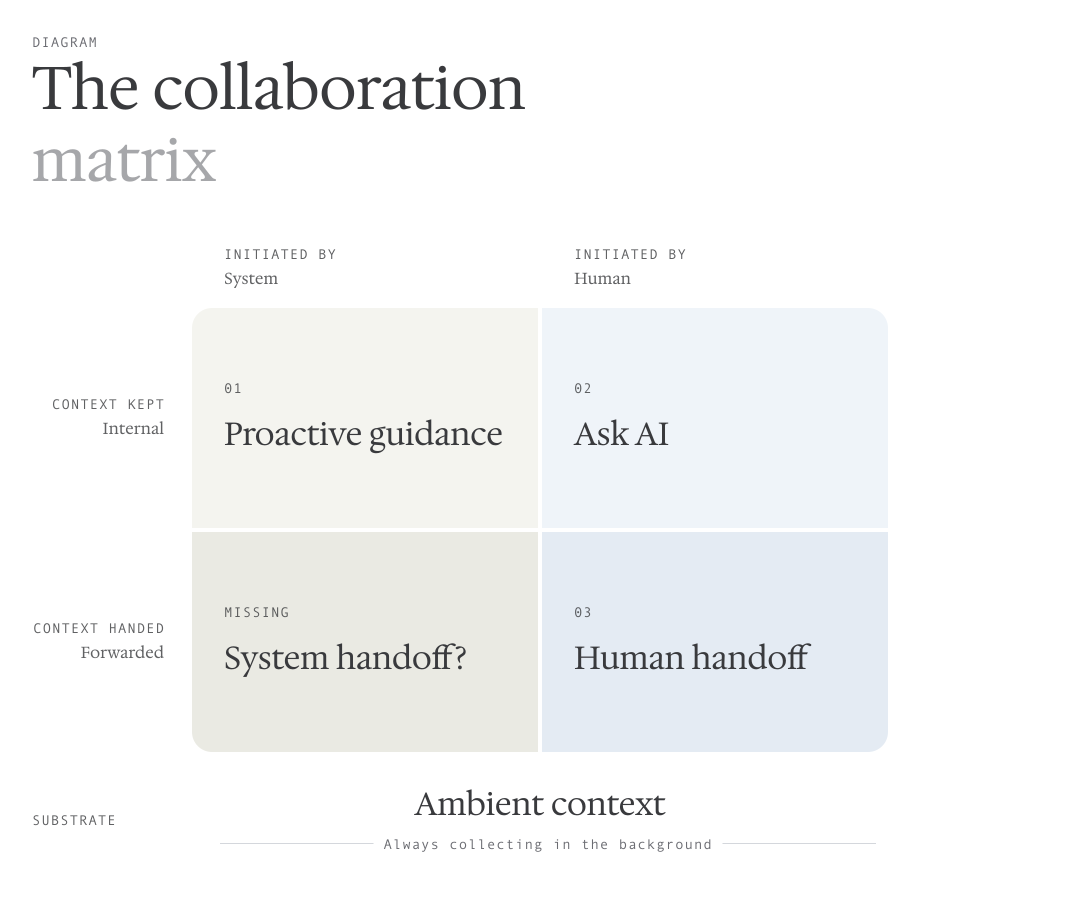
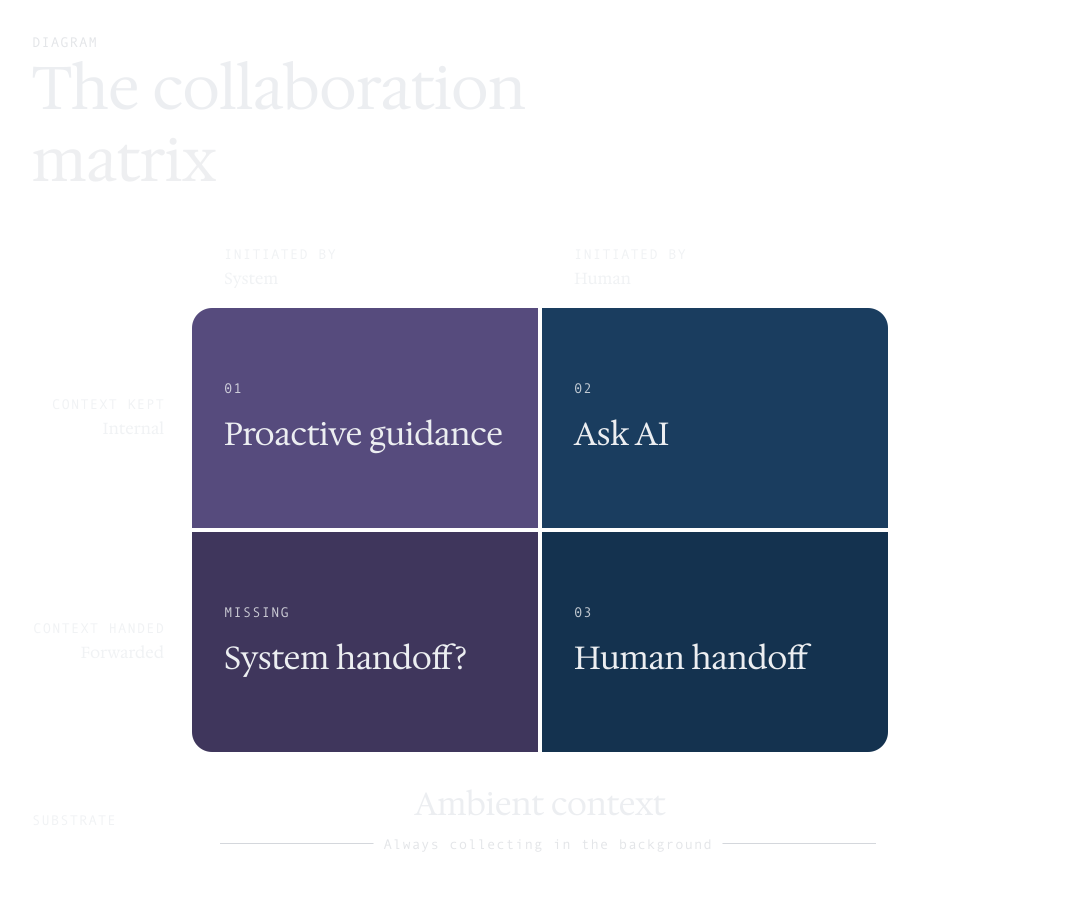
When we design the push and pull between AI and human, we map them on a matrix defined by two axes - who initiates, and what happens to context - over a shared substrate of ambient context, always collecting in the background.
1. Proactive guidance
AI listens continuously. When a substantive question emerges in the conversation and clears a confidence threshold, the system notifies the expert that it has a grounded answer ready before the expert asks. AI push, and it's essentially automated Q&A - the search anticipated before it's typed.
2. Ask AI
The human pull. AI responds using the ambient context already collecting in the background - and the inspectable rationale is exposed for a deliberate beat before the answer resolves. In a regulated domain, the expert needs to see how the model got there, not just what it concluded. Showing the reasoning is part of the trust contract.
3. Expert escalation
When AI is not enough, the expert escalates by typing /lead. AI packages the context into a structured handoff. The same pattern explored in depth in Case 3 - context forwarded when responsibility transfers.
The fourth quadrant - system-initiated handoff - is the unbuilt frontier. When should the system itself decide that a case has reached its boundary, package context, and route to a more senior expert without being asked? This is where preparation begins to cross into execution.
The shift in expert behavior across all three: less composing, more reviewing, steering, and deciding.
Graceful fallback during automation rollout
The matrix describes the shipped patterns, but the system isn't fully automated yet. Most expert work today still happens through manual tool selection - opening a workbench, pulling up a document, invoking a workflow. Until AI can reliably automate every one of those moves, design's job is to keep the manual path as fast as the automated one.
The most-used workbench tools are surfaced as one-click buttons inside the command bar's input area, ranked by frequency. The expert never navigates to find them - they're already there, alongside Ask AI. Human pull stays fast even as automation expands. As more capabilities move from manual to automatic, the buttons fade; until then, the path stays first-class.
Tuning the system
Continuous preparation creates problems that request-response systems do not have. What if suggestions arrive too often - does the expert tune them out? What if the thread of preparation grows too long - how does the expert navigate it?


Suggestion overload
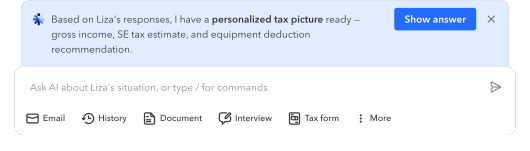
AI guidance required a fine balance: too many suggestions became noise; too few became useless. While we tuned the trigger threshold, the more important lever was what the notification revealed.
We tested two patterns: a blue pill that said “New guidance” and a preview notification that showed why the suggestion mattered: “Customer said X - do you want Y?” with Show answer and dismiss controls.
The pill created awareness, but not judgment. The preview let experts assess relevance before engaging. Counterintuitively, dismissibility increased trust: each nudge felt intentional, and dismissal became expert judgment rather than signal loss.
Preview notifications increased nudge-accept-to-adoption to 74.1%, compared with 62.8% in the passive scrolling control. Active acceptance became a quality filter.
Timing was the other lever. Live guidance runs a four-step pipeline - listen, detect, orchestrate, answer - and detection was the bottleneck. At a Global Engineering Day hackathon, our eight-person team quantized an open-source Llama 3 model and brought trigger inference under 80ms: the foundation for guidance that lands while it is still useful.
Lost in the thread
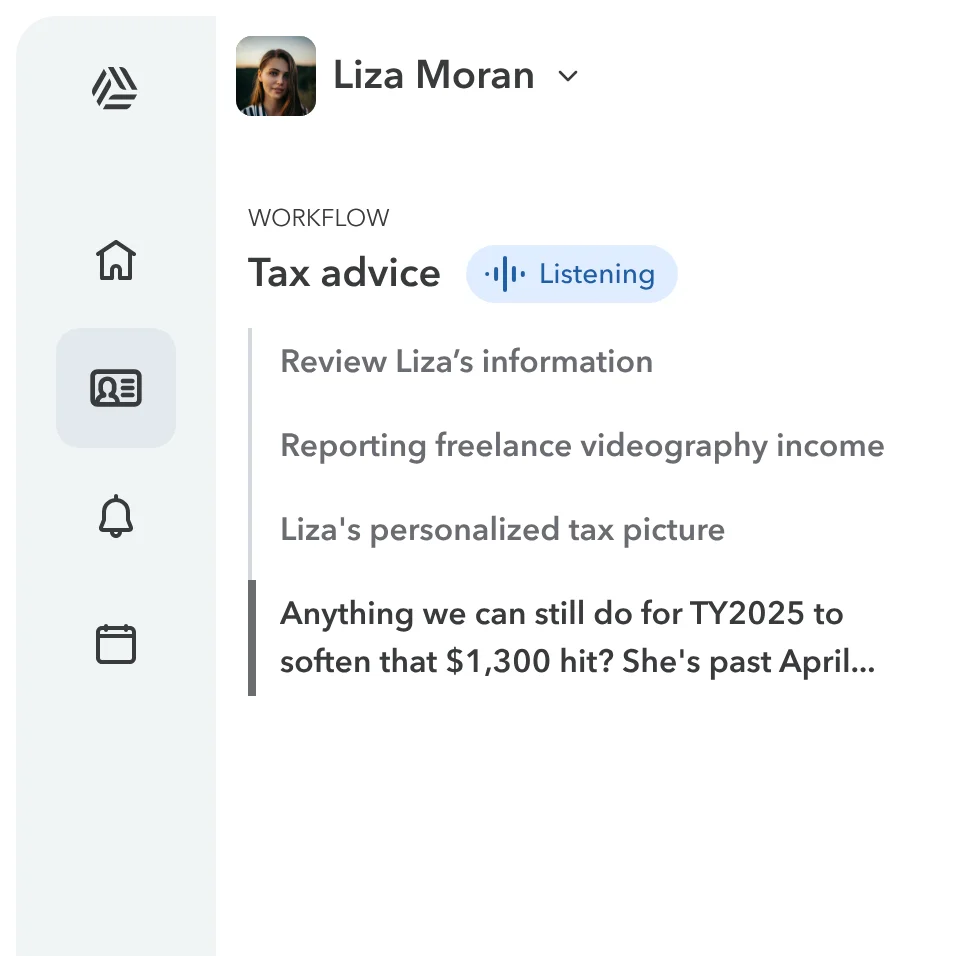
Continuous human–AI collaboration produces a thread that grows long fast, and the expert ends up scrolling a linear stream to find what mattered. Past a certain length, the stream stops being navigable.
Knowledge work is rarely linear - experts need to jump between moments. So we gave the thread a workflow: a table of contents on the left, with each step in the call (review information, recommend approach, prepare next action) as a navigable entry. The expert could jump to any moment, not just the most recent. It stuck: experts use workflow navigation in roughly 40% of live conversations.
Design leadership at platform scale
As the industry moves toward agentic AI and AI-native workflows, we are uniquely positioned to pioneer this paradigm at real-world scale.
10M
Customer served
$2.8B
TurboTax Assisted Service
We shipped in three stages aligned to the tax season: a production pilot (Dec 2025) validated the architecture; 1st Peak (Jan 2026) scaled across TurboTax - average handle time dropped 1.75 minutes per call (typical call roughly 20 minutes), and for Full Service experts weekly AI adoption reached 3.6x the prior baseline; 2nd Peak (Apr 2026) baselined the platform for 100% of TurboTax experts in the U.S. and Canada.
This isn't a startup iterating with a small user base - every stage lands on real experts, real customers, real legal and compliance stakes. Design's role was to derisk each transition. I built interactive prototypes that let partners argue with the design through artifacts rather than slides - the prototype was the meeting room.
I presented at VEP Design E2E, CEO staff, and TurboTax and Credit Karma all-hands. QuickBooks adapted the framework for All-in-One onboarding. Intuit's CTO cited the work as supporting the company's core AI bet. What started as a hackathon project became infrastructure across product lines.
What comes next
Execution
The next stage isn't preparing answers, it's executing actions. As AI moves from preparation to constrained action - updating records, routing cases, scheduling follow-up - the design problem shifts from oversight of suggestions to oversight of outcomes. How does the expert stay accountable for outcomes the system increasingly authors on its own? When should the system act without instruction? How are actions bounded, reversible, audit-trailed?
Memory
Expert-customer relationships in this domain are not single-session. TurboTax customers return every year. QuickBooks customers return many times per year, often weekly. The relationship is the unit of value, not the call. But each session today starts effectively stateless - the system carries forward summaries, but summaries compress, they do not preserve structure.
The deeper direction is treating each customer as persistent state: stable facts, interaction history, prior resolutions, patterns that accumulate. Each interaction would not just consume context but update it. AI would no longer re-derive what it should already know.
This emerged from collaboration with a platform architect and has been filed as a patent. The design question is the same one underneath the entire case, raised one level: how does the expert trust, verify, and override a system that now remembers more than they do?


Final thoughts
The specifics in this case study are TurboTax and QuickBooks expert service - regulated, high-consequence, operating inside systems of record.
But the design problem is general. Every knowledge workflow where AI can retrieve, ground, suggest, and begin to act will face the same question: how do you build a system where AI operates continuously and the human's judgment still governs the outcome?
When systems no longer wait for humans, the interface is no longer the product. The system is.